quarta-feira, 21 de julho de 2021

28ª Quinzena de Dança de Almada – International Dance Festival


.
É com muito prazer que informo que, o video :: DON'T LOOK :: foi seleccionado para a mostra de videodança do Festival de Dança em Almada, previsto para Setembro deste ano :  
" 28ª Quinzena de Dança de Almada – International Dance Festival, gostaríamos de informar que o trabalho Don't Look foi selecionado para ser incluído na Mostra de videodança deste ano. A(s) apresentação(ões) do vídeo será fixada durante o Festival, entre os dias 18 de setembro e 11 de outubro de 2020. "

https://www.instagram.com/p/CBN4c88lK2k/?igshid=1s4wlmlekkfep

Don´t Look :: Paulo Henrique & PlayBleu  

"Repetition changes nothing in the object repeated, but does change something in the mind which contemplates it." Gilles Delleuze

Conceived in partnership with Play Bleu, photography and graphic designer, the film focuses on a character in a specific period / period of time. The use of a classic frontal photographic angle with two distances, accumulating the gestures of the character of movement observed behind a translucent broken glass, filmed from the internal and external space (broken glass). This frontier functions as a new canvas for the viewer, also evoking political and social association with the current world, where the repetition of media images echoes the fluidity of their distribution, in contrast to the static space and the enclosure that the body is. observed in their bodies. real nature. In this visual environment and sound created, the film suggests other images that correspond to the individual experience of each viewer and the way they may seem or not to resonances through the repetitions of body image in the visual space created as the real body has no place of their own when it becomes an image (even repeated as a prayer or poem ..!? ...).

Direction Paulo Henrique & Play Bleu
Coreography | Performance Paulo Henrique
Image | Camera | Edition Play Bleu
Photography | Graphic Video Design Play Bleu
Music Fischerspooner Re-edit by Play Bleu
Producer | Executive Producer Paulo Henrique | Arte Total
Production Company Play Bleu | Arte Total

Photography Gallery : https://stampsy.com/stamp/17313

Don´t Look :: Paulo Henrique & PlayBleu


domingo, 28 de junho de 2020

The Topography of Tears / Rose-Lynn

A Topografia das Lágrimas 
(original: The Topography of Tears). 

O projeto de Rose-Lynn passou a chamar-se A Topografia das Lágrimas, através dele, ela estudou 100 lágrimas diferentes e descobriu que existem muitas diferenças nas lágrimas de acordo com o nosso sentimento. Cada gota de lágrima carrega um microcosmo de experiência humana. Com a ajuda de Joseph Stromberg, da Faculdade de Artes e Ciência de Smithsonian, Fisher tomou conhecimento de que existem três tipos principais de lágrimas: basais (aquelas que o corpo produz para lubrificar os olhos), 
reflexivas e psíquicas (desencadeada por emoções). 

“Emotions are not just the fuel that powers the psychological mechanism of a reasoning creature, they are parts, highly complex and messy parts, of this creature’s reasoning itself,” philosopher Martha Nussbaum wrote in her incisive treatise on the intelligence of emotions, titled after Proust’s powerful poetic image depicting the emotions as “geologic upheavals of thought.” But much of the messiness of our emotions comes from the inverse: Our thoughts, in a sense, are geologic upheavals of feeling — an immensity of our reasoning is devoted to making sense of, or rationalizing, the emotional patterns that underpin our intuitive responses to the world and therefore shape our very reality. Our interior lives unfold across landscapes that seem to belong to an alien world whose terrain is as difficult to map as it is to navigate — a world against which the young Dostoyevsky roiled in a frustrated letter on reason and emotion, and one which Antoine de Saint-Exupéry embraced so lyrically in one of the most memorable lines from The Little Prince: “It is such a secret place, the land of tears.”
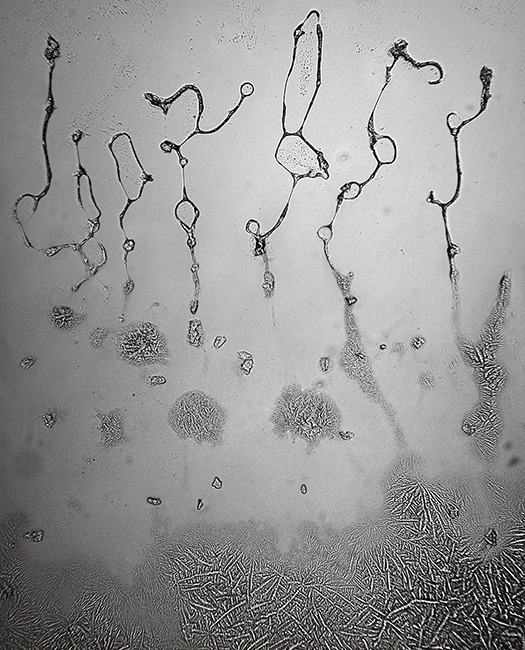
The geologic complexity of that secret place is what photographer Rose-Lynn Fisher explores in The Topography of Tears (public library) — a striking series of duotone photographs of tears shed for a kaleidoscope of reasons, dried on glass slides and captured in a hundredfold magnification through a high-resolution optical microscope. What emerges is an enthralling aerial tour of the landscape of human emotion and its the most stirring eruptions — joy, grief, gladness, remorse, hope — reminding us that the terra incognita of our interiority is better trekked with an explorer’s benevolent curiosity about the varied beauty of the landscape than with a conquistador’s forceful intent to control and sublimate. (Artist Maira Kalman affirmed this notion with great simplicity and poignancy in a page from her marvelous philosophical children’s book“If you need to cry you should cry.”)


Tears of grief
Tears of change
Tears of possibility / hope

Building on her previous mesmerizing photomicrographs of bees, Fisher uses the technological tools of science to probe the poetic, immaterial dimensions of a universal human behavior radiating infinite emotional hues. Most of the tears she photographed are her own, but she also looked at those of men, women, and children from different backgrounds, crying for a variety of reasons. Accompanying each photograph is a caption ranging from the descriptive to the lyrically abstract — tears of compassion, tears of grief, tears of remorse, “tears for those who yearn for liberation,” “tears of elation at a liminal moment.”


Tears of compassion
Tears of redemption

In the introduction, Fisher reflects on the symbolic undertones of this inquiry into “the intangible poetry of life,” a project nearly a decade in the making:
Though the empirical nature of tears is a composition of water, proteins, minerals, hormones, and enzymes, the topography of tears is a momentary landscape, transient as the fingerprint of someone in a dream. The accumulation of these images is like an ephemeral atlas.
[…]
Tears are the medium of our most primal language in moments as unrelenting as death, as basic as hunger, and as complex as rites of passage. They are the evidence of our inner life overflowing its boundaries, spilling over into consciousness. Tears spontaneously release us to the possibility of realignment, reunion, catharsis, intractable resistance short-circuited… It’s as though each one of our tears carries a microcosm of the collective human experience, like one drop of an ocean.


Tears of remorse
Onion tears
Tears for what couldn’t be fixed

Fittingly, the book features a short essay on tears by the poet Ann Lauterbach, who observed in another beautiful meditation on why we make art that “the crucial job of artists is to find a way to release materials into the animated middle ground between subjects, and so to initiate the difficult but joyful process of human connection” — a perfect articulation of the heart of Fisher’s project. In her essay for the book, Lauterbach writes:
“For a tear is an intellectual thing,” the great subversive 19th-century poet William Blake wrote, railing against the Deists, classical and contemporary; he believed they had stripped religion of its signal call for forgiveness, assigning too much authority to a single God and making human life untenable in its guilty abrasions. Tears are intellectual because they come from thoughts that spill over the body’s containing well; they are the secretion of excess we assign to emotion; perhaps emotion itself is simply caused by a surfeit of thought. One tries to unbind these durable dualities, to allow for the morphological shift that might allow the human creature to be complex but integrated, not divided into anatomical parts, all nouns and no transitive verb. We are not yet mechanical, technological things, we are intellectual — thinking — beings, and we cry when stirred beyond the capture of signifying Logos, which relents into flows of passionate silence. Perhaps this flow is the very proof that we cannot put our feelings in one place and our thoughts in another, the bleak result of a certain rationalism that threatens to overtake our civility — our capacity to forgive — and wants to make all ideas into abstractions, rigid and blunt, free of secretions.


Overwhelmed tears
Tears after goodbye

quarta-feira, 3 de julho de 2019

The 8 Best Photoshop Plugins for Designers

When it comes to graphic design or photo editing, chances are good that Adobes Photoshop is the first thing to come to mind. There’s no doubt that this amazing tool is every designer’s holy grail.
The Adobe Suite is one of the most popular and powerful collections of tools for designers and photo editors, widely used by experts and beginners, alike. Adobe does a lot of the heavy lifting when it comes to manipulating designs and images, Photoshop (as well as Lightroom and Illustrator) is also compatible with a long list of third-party plugins that can ramp up the tool’s effectiveness big time.
These Photoshop plugins are used to add special features or effects, simplify the process of various graphic design effects, or a make your digital creations more impressive. Whether you’re a graphic designer or a photo manipulator, an expert or beginner, you’ll certainly be able to make use of some or all of these photoshop plugins for your upcoming projects.
The following represents some of the best Photoshop plugins available to graphic designers.

01. ON1 Effects

photoshop plugins
Photo by Bliss Studio
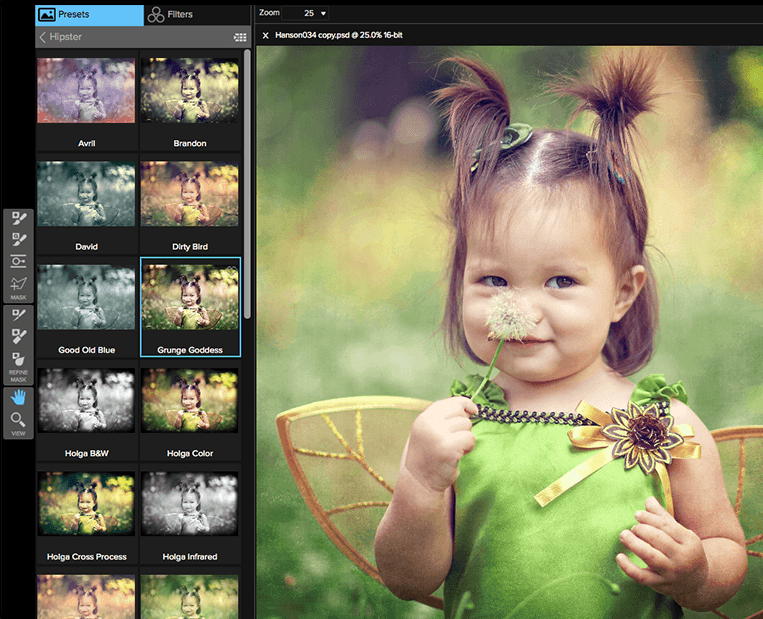
ON1 Effects is an easy one-click panel in Photoshop, which can also work as a standalone app. Essentially, it functions as a viable alternative to Adobe’s collection of graphic design software offerings. This Photoshop plugin allows you to add effects to your images and comes with a diverse selection of filters (including some that feel a lot like Instagram), including adjustable contrasts and an HDR effect.
Users can choose from the classic filters, like vignette and cinematic styles, and add them on top of different layers. Filters can be easily stacked together and adjusted for quick customization.
Price: ON1 is available as a download with a free 30-day trial. For a full license, you can purcase ON1 for a one-time fee of $119.99.

02. Pexels Plugin

photoshop plugins
One of the most critical resources that designers need for their projects is a deep pool of stock images at their disposal. Usually, you’ll need these images for background enhancement, textures, or maybe just some experimentation. Bonus points if you can get unfettered access to royalty-free stock images.
Pexels.com is an awesome resource when it comes to free stock images. The website also offers designers a free plugin for your Photoshop installation, granting easy access to its photo library without requiring you to open a new window or a need to download images you’ve got your eye on.
By adding this plugin to Photoshop, you can browse images according to their popularity, images that have been recently added to the website, or by using specific tags and search terms, depending on the needs of your projects.
Price: Completely free in terms of both the app and stock images!

03. RH Hover Color Picker

photoshop plugins
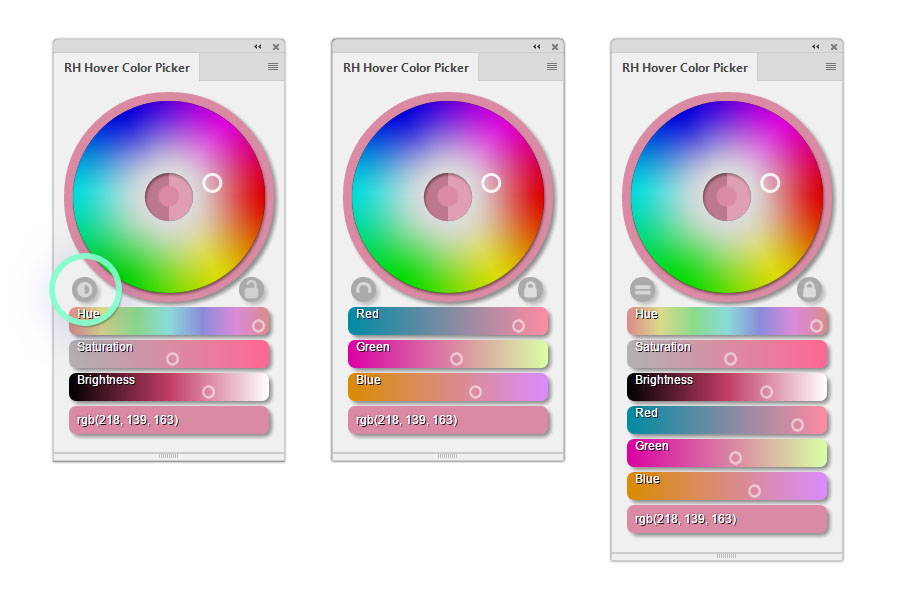
If you’re working with color, listen up: Adobe Photoshop does have a color picker included with the software. That said, RH Hover’s version is easier to use and arguably better than Photoshop’s standard picker—a tool that many describe as being too complex and all over the place.
Good news: there are Photoshop plugins that allow you to have a clean, light, and fast color picker. This particular tool allows you to easily customize your color sliders while giving you a lot more control compared to what you can do with the standard offering.
When working in Photoshop, designers need easy access to a wide range of color, which is why Adobe includes a color picker as part of their standard interface panel. However, users also want the option to see a full, unobscured view of the project they’re working on. RH Hover Color Picker only shows when you hover over its minimized version. When you go back to designing, it will automatically hide. Out of sight, out of mind!
Price: $16, as a one-time fee.

04. Fontself Maker for Photoshop CC

photoshop plugins
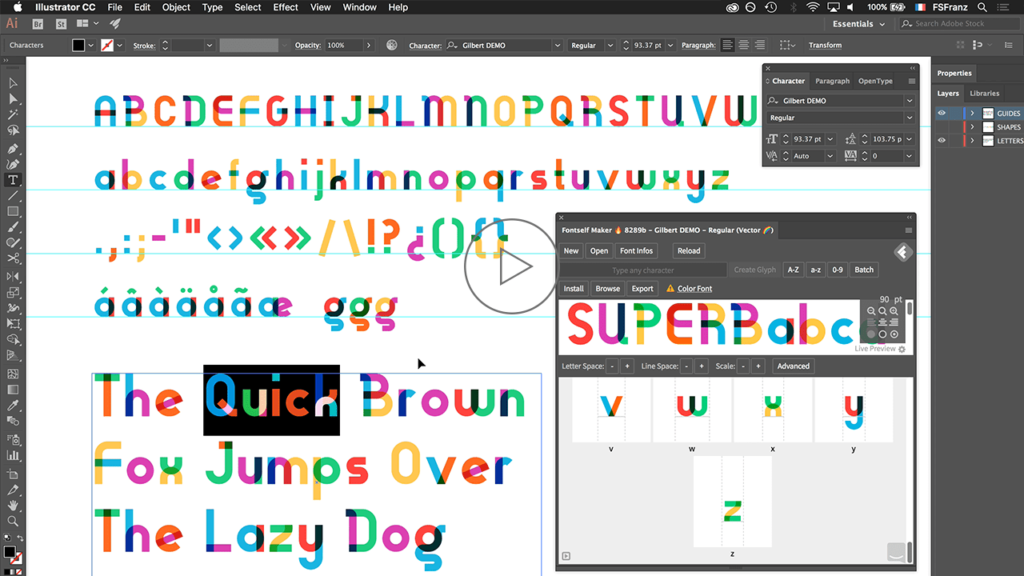
There are many free fonts available online but many designers (and their clients) prefer to have a unique and original typeface for their project. If you want to create your own fonts, Fontself Maker for Photoshop CC is a plugin worth checking out.
Fontself works with both Photoshop and Illustrator CC. This Photoshop plugin allows you to easily turn your lettering into OpenType fonts.
Just simply drag and drop layers to create characters, get colors, textures, or shades.
Price: £43 (~$57), as a one-time fee.

05. Nik Collection

photoshop plugins
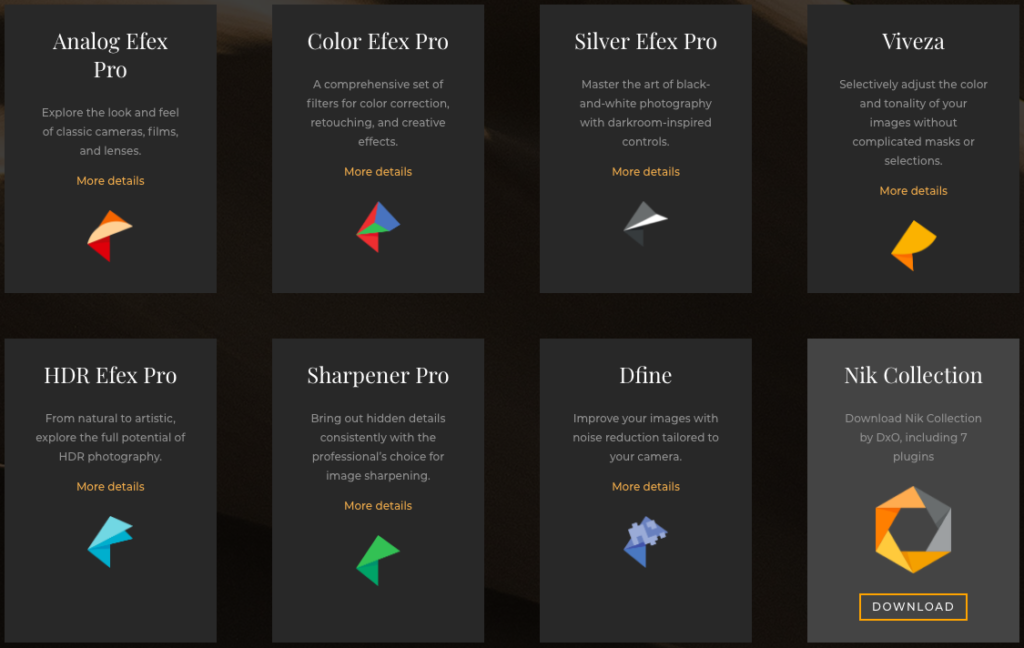
Nik Collection is one of the most popular Photoshop plugins in the design industry. The Collection is made up of seven amazing Lightroom and Photoshop plugins that each work independently.
Better yet, you’ll be thrilled to learn that Nik Collection lived a former life as an expensive $500 professional photo processing software program, until Google took over and made it available for free.
Interestingly enough, in 2017, Nik Collection changed hands once again. Google decided to drop Nik Collection, which was then acquired by DxO, who decided to resume its development. Nik Collection’s new home company is planning to release a new Collection in mid-2018.
In the meantime, here is a look at what is currently included in this particular collection of Photoshop plugins:
  • Analog Efex Pro: Allows you to explore the classic look of analog cameras, film stock, and lenses.
  • Color Efex Pro: A collection of filters for color correction, retouching, and effects.
  • Dfine: Allows you to process your image with noise reduction.
  • Sharpener Pro: Sharpening tool that allows you to bring out the hidden details of your pictures.
  • HDR Efex Pro: Process your images and turn them into artistic HDR photos.
  • Viveza: Allows you to adjust tone and color of the image without the use of masking or selection.
  • Silver Efex Pro: Turn your photos into stunning black and white images with darkroom-inspired controls.

06. Luminar

photoshop plugins
If your brand of design revolves around editing photos, then Luminar is the Photoshop plugin for you.
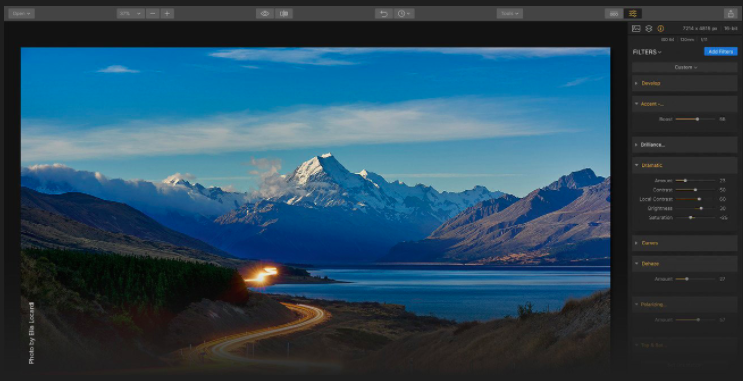
The tool functions as another Lightroom offshoot (note that it plugs right into Lightroom, too) and comes with over 300 powerful tools: including filters, a long list of one-click presets, and the Accent AI filter.
Luminar has long been available to Mac users but just recently became available to PC users, too (at least those using Windows 7 and above).
What’s really cool about Luminar is that it offers built-in workspaces equipped with a guided workflow that can help you get your projects done more effectively: with less blood, sweat, and tears.
Some of Luminar’s notable features include:
  • Easy sky replacement
  • Object removal
  • Customized workspace
  • Masking and presets
Price: $69, as a one-time fee.

07. Layrs Control 2

photoshop plugins
If you’ve used Photoshop at all, you know that for better or worse, layers play a major role in the design process. Sometimes you create so many layers within your project that organizing them becomes a project in and of itself.
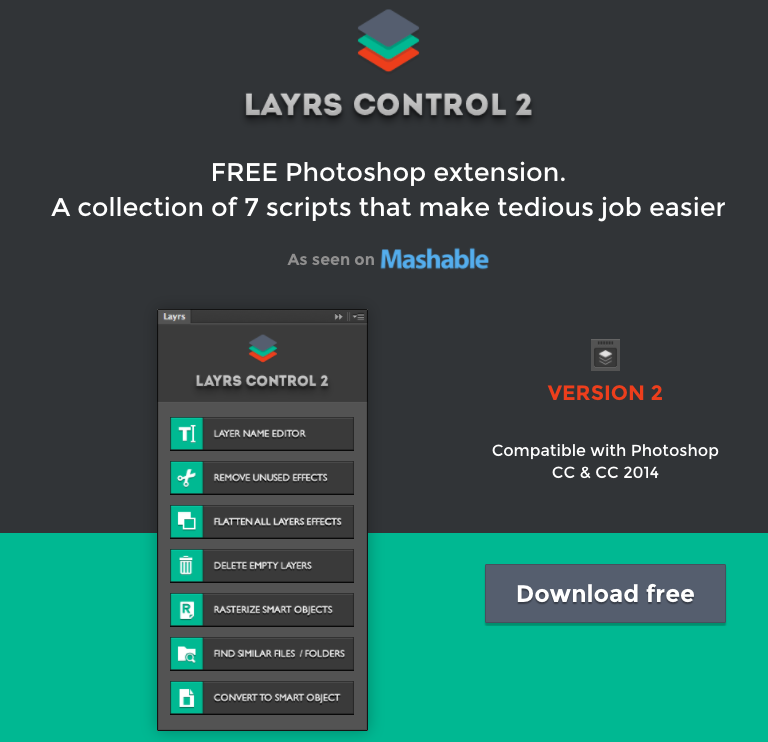
With Layrs Control 2, you can easily manage your layers through a variety of actions accessible through a simple panel.
Here’s a quick look at the features offered by the Layrs Control 2 Photoshop plugin:
  • Layer name editor
  • Flatten all layers
  • Delete empty layers
  • Rasterize smart objects
  • Remove unused effects
  • Find similar files or folders
  • Convert smart objects
Say goodbye to the idea of doing all these tasks manually. This Photoshop plugin allows you to execute these tasks in simple and easy steps, allowing you to save more time on organizing and freeing up time for design.
Price: Completely free!

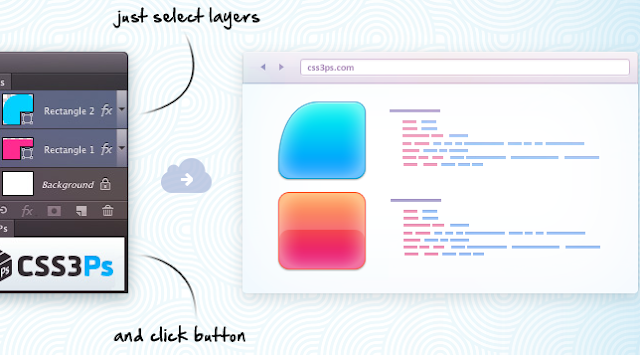
08. CSS3Ps

photoshop plugins
If you’re a web developer, this Photoshop plugin is for you! CSS3Ps allows developers to translate individual Photoshop layers into CSS code.
Photoshop does already have this feature, but the CSS3Ps plugin offers other features that level up the standard offering, such as the ability to provide SCSS and SASS codes. The Photoshop plugin also allows you to work a lot faster, especially when dealing with more complicated designs.
Price: Completely free!

segunda-feira, 1 de julho de 2019

Arlindo Fagundes - Banda Desenhada - Pitanga


.
Um orgulho o meu nome constar nos agradecimentos.
BD
Pitanga "O Colega de Sevilha"

Arlindo Fagundes & José Pedro Costa

http://www.arlindofagundes.com/bd9.htm
.

terça-feira, 11 de junho de 2019

Apresentação do livro O Colega de Sevilha de Arlindo Fagundes # Livraria 100ª Página


.

Apresentação do livro O Colega de Sevilha de Arlindo Fagundes, edição Arcádia

Apresentação do livro O Colega de Sevilha, de Arlindo Fagundes
“O Colega de Sevilha” é o terceiro álbum das aventuras de Pitanga (depois de “ La Chavalita” e de “A Rapariga do Poço da Morte”) e o primeiro a ser editado a cores (com a assinatura de José Pedro Costa). Pitanga, que usa um quase interminável cachecol com bolas pretas, vive com Armando, o seu braço direito que, embora cego, vê muita coisa em que outros não reparam, sendo um pouco destravado a falar. Esta banda desenhada, criada por Arlindo Fagundes, evidencia um estilo e consistência narrativa muito originais, com predominância de um humor muito pessoal, aliado ao seu habitual e vigoroso traço negro. 

Braga
14 Junho às  18:30
Livraria 100ª Página

Mais informação:
ou